Spotify Pre-Release Listening Parties: How Independent Acts Unlock In-App Audio Rooms
Getting fans to actually care about an upcoming album launch is harder than ever. We’ve all seen the standard rollout strategy: post a cryptic teaser on Instagram, drop a pre-save link in your bio, and pray your followers remember to check Spotify at midnight. But let’s be real—asking fans to click through third-party smart links or leave their favorite apps rarely yields the stream numbers independent artists need.
Spotify saw this friction and built a native fix: Spotify Countdown Pages and Live Audio Listening Parties.
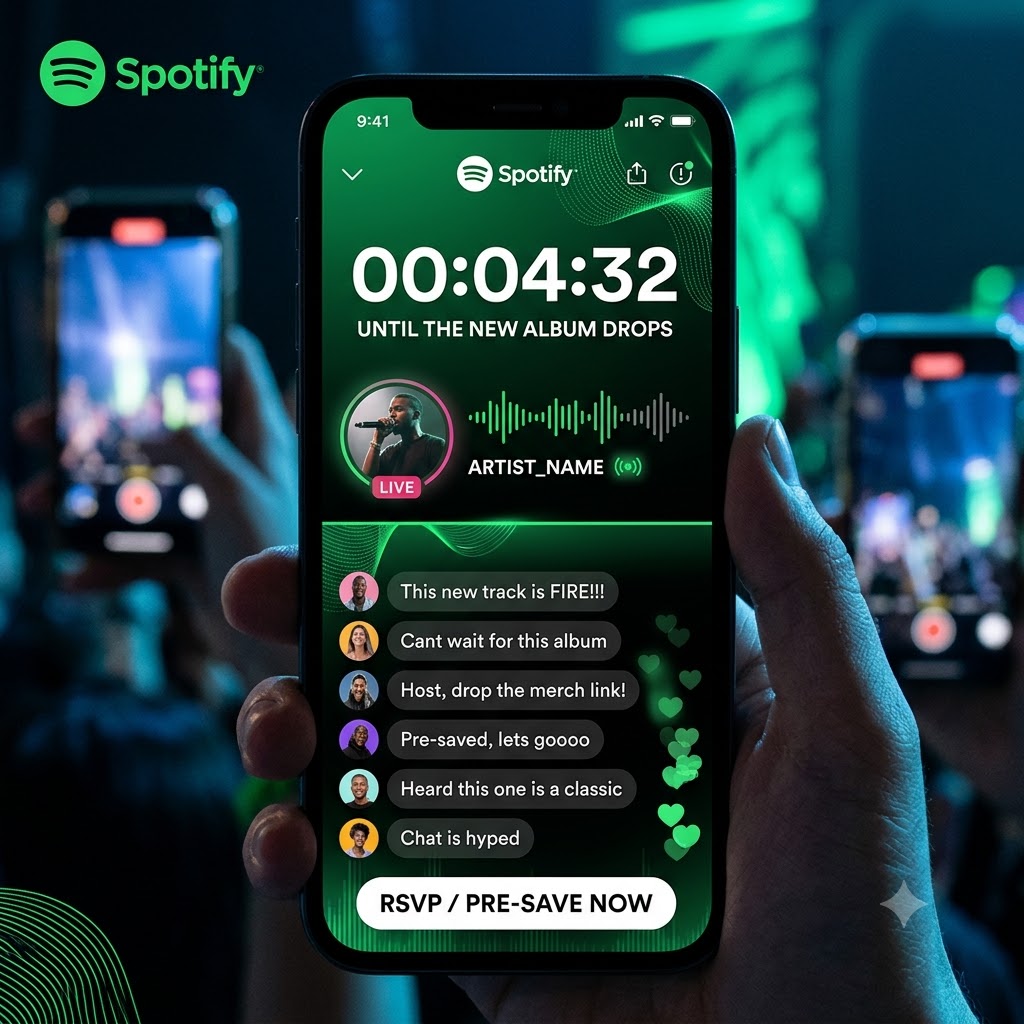
Instead of fighting external algorithms, independent acts can now host real-time, in-app virtual listening events. Fans can pre-save your music, chat with you live, buy exclusive merch, and hear your new record the second it drops—all without ever leaving Spotify.
If you want to know how to host a spotify countdown listening party, you need to understand the underlying mechanics, strict account thresholds, and real-time moderation tools required to turn your release into a genuine event.
1. The Gatekeepers: Eligibility & Account Requirements
Before you start planning a virtual launch event, you have to make sure Spotify will actually let you open the door. Spotify doesn’t automatically hand out Countdown Pages to every brand-new account; they reserve these features for profiles that meet specific engagement baselines.
Profile & Audience Thresholds
-
Active Listener Metrics: Spotify typically looks for artists who maintain between 3,000 to 5,000 Monthly Active Listeners (MAL). This metric is different from the public monthly listener count visible on your main artist profile. You can check your exact MAL footprint inside your Spotify for Artists portal under Audience > Segments.
-
Administrative Access: You must have Admin or Editor permission levels for your Spotify for Artists team account. Standard viewer accounts cannot initialize countdown hubs.
Eligible Release Types
Not every track qualify for a full native campaign. Spotify limits these tools to specific multi-track projects:
-
Allowed Formats: Full-length studio albums and multi-track EPs.
-
Excluded Formats: Single releases, re-issued catalog tracks, standalone remixes, anniversary re-packs, and multi-artist compilation tapes are currently restricted.
-
Delivery Timelines: Your distribution company (DistroKid, TuneCore, CD Baby, etc.) must deliver your final DDEX audio files and metadata to Spotify at least 14 to 21 days before your street date.
If your numbers fall short of the entry threshold, don’t worry. You can build the pre-release follower momentum needed to host live events using our targeted rap playlist placements to get your stream counts and active listener stats into eligible territory.
2. Dynamic RSVP Mechanics: Setting Up Your Page
Once your distributor delivers your album data to Spotify, setting up your Countdown Page takes less than ten minutes inside your dashboard. The goal here isn’t just to publish a static page—it’s to turn passive scrollers into confirmed release-day listeners.
Step-by-Step Setup Guide
-
Access Upcoming Releases: Log into Spotify for Artists on desktop, head to the Music tab, and click Upcoming.
-
Initialize Your Hub: Find your upcoming EP or album on the list and select Get Started.
-
Attach Visual Teasers (Spotify Clips): Upload short, vertical videos (under 30 seconds). Share raw behind-the-scenes footage, short studio snippets, or quick messages breaking down the album concept. Visuals drive significantly higher pre-save conversions than text alone.
-
Link Merch & Physical Formats: If you have vinyl pressings, CDs, or limited-edition apparel tied to your Shopify store, pin them directly to your Countdown Page so fans can buy physical goods while waiting for the launch.
-
Feature on Profile: Set the Countdown Page as your Artist Pick so every visitor to your main profile lands directly on your event RSVP.
How the RSVP Mechanics Work on the Fan End
When a listener stumbles across your Countdown Page, Spotify makes it seamless for them to convert:
-
One-Tap Pre-Saves: Tapping “Pre-Save” saves the album straight to the fan’s library. The moment the clock strikes midnight on release day, the tracks automatically appear in their saved collection.
-
Automated Mobile Push Alerts: Fans who RSVP are automatically opted into receiving push notifications on their phones when the album officially releases or when you launch a live audio stream.
-
Live Visual Countdown: A dynamic countdown clock builds real sense of urgency, ticking down the exact hours, minutes, and seconds until the record drops.
3. Inside the Audio Rooms: Live Chat & Event Moderation
The live listening party is where the real magic happens. By launching an in-app audio room right before your record drops, you can turn a standard midnight release into an exclusive digital album release show.
Hosting an Audio Stream
As the countdown clock nears zero, you can open your live audio room directly inside the Spotify app. You can pop on the mic to welcome fans, introduce individual tracks, share the real stories behind your lyrics, and talk about your production process in real time. It feels like an intimate, VIP radio broadcast hosted by the artist themselves.
Managing the Chat Room
Live events can get chaotic fast, especially when hundreds of hyper-engaged fans hit the chat at once. Spotify equips artists and management teams with robust moderation toolsets to keep the event clean and focused:
-
Automated Keyword & Profanity Filters: Built-in safeguards automatically block toxic language, hate speech, and automated bot spam from cluttering your chat stream.
-
Team-Based Administrative Controls: Your designated team members can log in alongside you to manage the crowd. Mods can delete individual messages on the fly or temporarily silence disruptive users.
-
Pinned Announcements: Use pinned chat banners to direct fan attention to high-value links, such as exclusive merch drops, upcoming tour tickets, or secondary platform links.
4. The 4-Week Release Timeline for Max Velocity
To help you get everything organized without missing critical deadlines, use this simple week-by-week timeline to structure your pre-release campaign:
Week 1: Delivery & Metadata
-
Finalize your master tracks and cover artwork.
-
Deliver your project through your distributor at least 3 to 4 weeks before your release date.
-
Verify your active listener metrics in Spotify for Artists under Audience > Segments.
Week 2: Page Buildout & Asset Loading
-
Locate your release in the Upcoming tab and build your native Countdown Page.
-
Record and upload 3 to 5 Spotify Clips giving fans an inside look at your creative process.
-
Sync your Shopify merch store to pin physical vinyl or apparel to your event page.
Week 3: Driving Traffic & Gathering RSVPs
-
Pin your Countdown Page to the top of your main Spotify profile as your Artist Pick.
-
Share direct links across your social media channels, newsletter, and short-form video content.
-
Encourage your core fanbase to hit the Pre-Save button to lock in their push notifications.
Week 4: Release Night Live Event
-
Log into the Spotify app 30 to 45 minutes before midnight local time.
-
Start your live audio stream, pop on the microphone, and kick off the live fan chat.
-
Walk listeners through your tracklist track-by-track as the clock hits zero, driving maximum day-one stream velocity.
Maximize Your Release-Day Stream Velocity
Pre-saves are only half the battle—you need real streams hitting your catalog the second your record drops to push your tracks onto algorithmic playlists. Submit your release to the Music Submission Portal to land high-impact rap playlist placements and build the momentum your launch deserves.