Fixing Metadata Character Limits on DSP Title Tags for Complex Remakes
If you’ve ever uploaded a complex remake, VIP edit, or stacked multi-artist collaboration to a distributor only to get hit with a generic metadata rejection email 24 hours later, you know how frustrating the process can be.
Getting a track from your DAW onto platforms like Spotify, Apple Music, and Amazon Music requires passing through strict digital service provider (DSP) style guides. When you try to squeeze primary artists, featured vocalists, remixers, and custom production tags into a single track title, you quickly hit character constraints and metadata syntax errors.
Understanding spotify song title character limit guidelines and general DSP title formatting rules is critical to ensuring your releases drop smoothly on scheduled release dates without getting caught in editorial review queues.
What Are the Spotify Song Title Character Limit Guidelines?
Technically, Spotify’s ingestion engine doesn’t just cut off titles at a single hard character number like a Twitter post. Instead, the limitations come down to a mix of UI display constraints and strict adherence to the Music Metadata Style Guide shared across all major streaming services.
1. The Ideal Character Length
-
Main Song Title: Keep the main track name under 30 characters whenever possible.
-
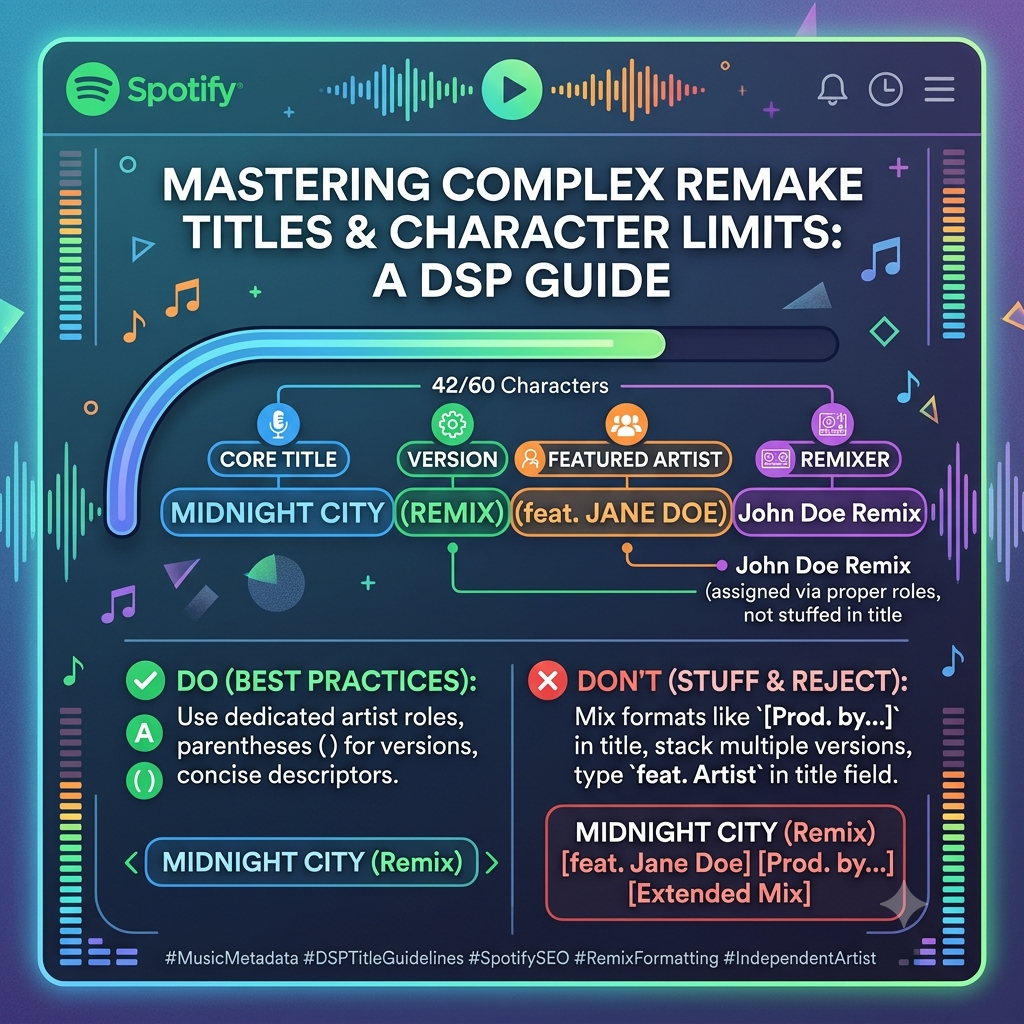
Full Title String: The total string—including version descriptors, remix identifiers, and featured artist tags—should ideally stay under 60 to 80 characters.
-
The Truncation Risk: Beyond 60 characters, Spotify’s mobile and desktop interfaces start truncating song titles with ellipses (
...). This ruins visual presentation on playlists and lock-screen players, hiding important info like remix names or featured performers.
2. Distributor Auto-Rejection Triggers
Distributors like DistroKid, TuneCore, CD Baby, and Symphonic run automated compliance bots during upload. If your title string exceeds around 100 characters, or contains forbidden syntax like standard text-stuffed artist names (feat. Artist), the system will automatically pause your delivery before it ever reaches Spotify.
Anatomy of a Failed Remake Title
Complex remakes present a unique metadata challenge because they pack multiple descriptive tags into one package:
-
Base Track Name: The core title of the song.
-
Featured Artists: Guest singers, rappers, or instrumentalists.
-
Version Descriptors: Acoustic, Remix, VIP Mix, Extended Version, Live.
-
Producer Tags: Credits often added by producers looking for brand recognition.
When independent creators pack all these elements directly into the main song title field, the resulting title string becomes bloated, messy, and non-compliant:
The Non-Compliant Example:
Midnight City (Remix) [feat. Jane Doe] [Prod. by Hitmaker] (Extended Club Mix) (2026 VIP Edit)
Why DSPs reject this:
-
Redundant Version Descriptors: You cannot stack
(Remix),(Extended Club Mix), and(2026 VIP Edit)together. DSPs view this as keyword stuffing. -
Improper Feature Tags:
[feat. Jane Doe]hardcoded into the title field breaks search indexing. -
Forbidden Producer Tags: Placing
[Prod. by...]in the main title string triggers automated style-guide strikes on almost every major store.
Practical Formatting Rules for Complex Remakes
To get complex remakes approved on your first submission, break your track metadata into proper structural buckets.
Rule 1: Use Dedicated Metadata Roles (Stop Title-Stuffing)
The single biggest mistake artists make is typing featured artists directly into the title text box.
Modern distributor dashboards provide individual contributor roles. When entering your release info:
-
Enter the Title as only the core song name.
-
Add guest performers under the Featured Artist contributor tab.
-
Add remixers under the Remixer contributor role.
When formatted correctly at the distributor level, Spotify automatically appends the featured artist to the metadata display layer without bloating the underlying track title string.
Rule 2: Master Parentheses () vs. Brackets []
DSPs use strict parsing logic for special characters. Mixing up round parentheses and square brackets will flag your submission.
-
Use Parentheses
()for Official Version Info: Place official release version identifiers inside standard parentheses right after the title text.-
Correct:
Midnight City (VIP Mix) -
Correct:
Midnight City (Acoustic Version)
-
-
Use Brackets
[]Only for Specific Secondary Descriptors: Square brackets are reserved for specific secondary attributes like language variations or alternate track versions when requested by distributors. -
Avoid Combining Both: Never chain
(Remix) [Radio Edit]back-to-back. Choose the single most accurate descriptor.
Rule 3: The [Prod. by] Rule
Producer tags in track titles are heavily restricted. Apple Music explicitly bans terms like [Prod. by...], [Produced by...], or (Beat by...) in title tags. Spotify’s metadata guidelines strongly discourage them.
How to handle production credits safely:
-
Put producer credits into the official Producer Credit metadata field on your distributor dashboard so they display in the song’s “Show Credits” panel.
-
If your target audience requires the producer’s brand name in the title for marketing reasons, format it strictly according to your distributor’s guidelines, keeping it concise:
Song Title (Prod. Producer Name). However, removing it from the title altogether remains the safest bet against DSP rejection.
Clean Formatting Examples for Common Remake Scenarios
Here is how to properly structure complex remake titles to satisfy character limits and style rules:
| Remake Scenario | Incorrect / Flagged Title | Clean / DSP-Approved Title |
| Guest Feature + Remix | Summer Nights feat. John Doe (Jane Doe Remix) |
Title: Version: Add John Doe as Featured Artist in contributor fields. |
| VIP Club Edit | Rhythm (VIP Club Edit Mix) [Prod. by Beats] |
Title: Version: Move producer tag to credit fields. |
| Acoustic Cover / Remake | Wonderwall (Acoustic Cover Version 2026) |
Title: Version: |
Pre-Flight Metadata Checklist for Independent Releases
Before hitting the submit button on your distribution dashboard, run your release details through this quick checklist:
-
[ ] Audit Total Character Count: Is your title text under 30 characters and the full string under 60 characters?
-
[ ] Strip Redundant Words: Have you removed duplicate descriptors like “Remix Mix” or “Official Audio”?
-
[ ] Separate All Collaborators: Are guest features and remixers assigned to dedicated contributor roles instead of typed manually into the song title line?
-
[ ] Clean Up Bracket Syntax: Are version descriptors enclosed in standard parentheses
()rather than square brackets[]or curly braces{}? -
[ ] Verify Title Case: Is your title formatted in standard Title Case capitalization without ALL-CAPS hype formatting?
Getting your metadata formatted properly right out of the gate saves days of back-and-forth emails with support teams and prevents missed launch targets.
Once you ensure your metadata is compliant across all stores, then scale your record via our music submission portal (https://itshiphopmusic.com/submit/music-submission/).
Keep Your Catalog Active and Earning
Keep your music catalog active and earning. Submit your music through our Music Submission Form.