How the Spotify “Fans Also Like” Algorithm Actually Works (and How Co-Saves Build Your Artist Cluster)
If you’ve ever opened your Spotify for Artists dashboard, glanced at the “Fans Also Like” row, and wondered how the hell Spotify decided to pair you with a specific set of artists, you aren’t alone. For independent acts, landing in the right algorithmic neighborhood is more than just a quick ego boost—it’s the primary engine driving your organic discovery, radio algorithm triggers, and automated release radar placements.
The common assumption is that Spotify’s recommendation engine scans your audio file, tags the tempo, identifies your genre as “hip-hop,” and pairs you with everyone else in that genre bucket.
That isn’t how it works.
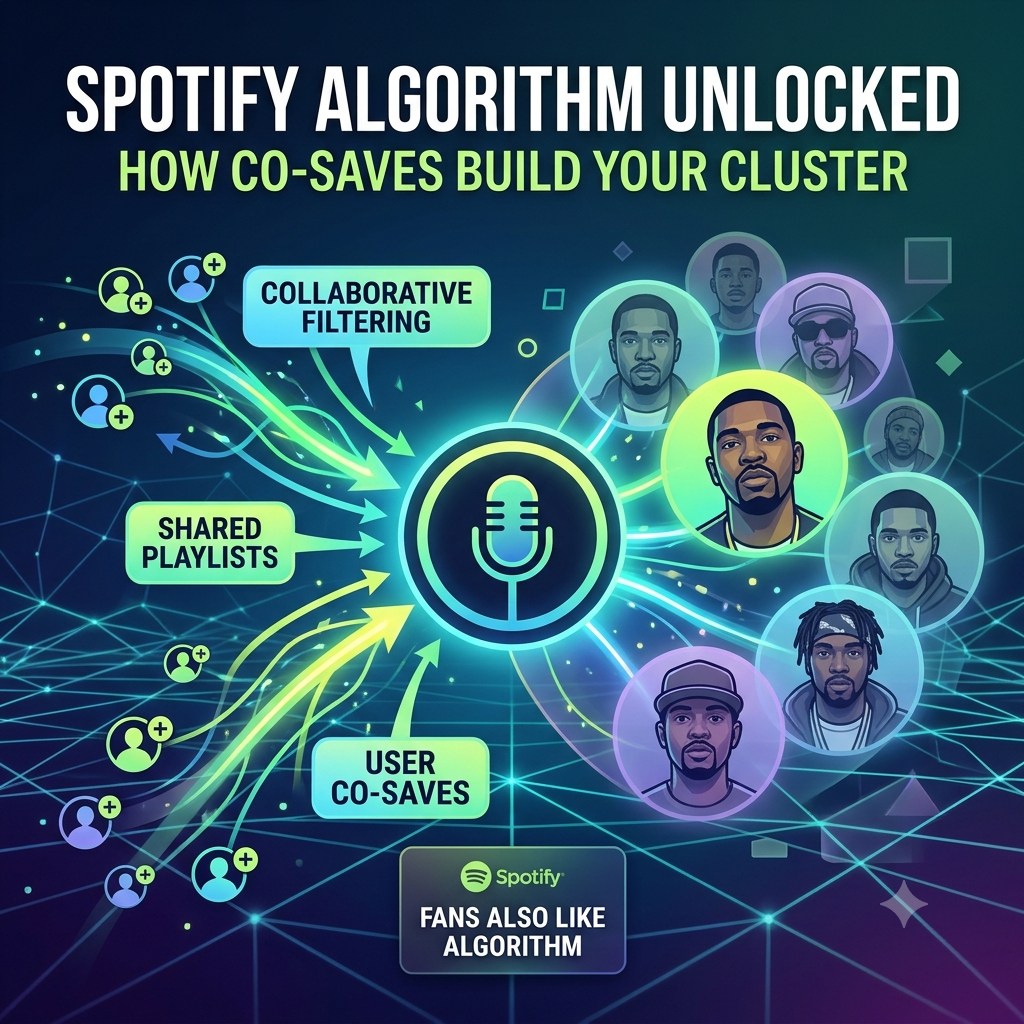
While Spotify’s acoustic analysis (called raw audio processing) takes note of things like energy level and instrumentation, the actual heavy lifting behind your recommendations comes down to collaborative filtering. In simple terms: Spotify doesn’t care as much about what your track sounds like as it does about who is saving your music alongside whom.
Understanding how co-saves, shared user playlisting, and listening sessions build your artist cluster gives you a practical roadmap to train the algorithm intentionally instead of leaving your growth to chance.
What Is Collaborative Filtering in Spotify?
To understand why your “Fans Also Like” section looks the way it does, you have to look at how Spotify maps out human behavior across hundreds of millions of users daily.
Collaborative filtering is a matrix-based recommendation model. It operates on a straightforward behavioral premise:
If Listener A frequently saves tracks by Artist X and Artist Y, and Listener B regularly listens to Artist X, Spotify calculates a high mathematical probability that Listener B will also enjoy Artist Y.
[ Listener A ] ──Saves──> [ Artist X ] & [ Artist Y ]
                                 │
                             Overlaps
                                 ▼
[ Listener B ] ──Saves──> [ Artist X ] ──Recommended──> [ Artist Y ]
When thousands of users display this exact overlapping pattern over time, Spotify’s machine learning models link those artists together into a distinct artist cluster.
This cluster is essentially your digital neighborhood. Once you are locked into a cluster, Spotify’s automated algorithmic playlists—such as Discover Weekly, Artist Radio, and Daily Mixes—begin feeding your tracks directly to fans who listen to the bigger, more established artists inside your specific cluster.
Why Co-Saves Matter Far More Than Passive Streams
Not all engagement signals carry equal weight in Spotify’s algorithm. A stream where someone lets a passive background playlist run for 31 seconds tells the algorithm very little. A save or a playlist add, on the other hand, is a high-intent signal.
Co-saves are the single strongest trigger for building an artist cluster for three reasons:
1. Intentionality
A passive stream happens by accident. A save happens when a listener intentionally decides they want to hear a track again. When a fan saves your song into their personal library during the same listening session they saved a track by an established act, Spotify registers a direct relationship between your two catalogs.
2. User-Generated Playlist Overlap
When independent curators, tastemakers, or regular listeners add your song to personal playlists right next to well-known artists in your lane, they are manually drawing a line between you and those acts. The algorithm reads these user-built playlists as ground-truth training data. The more times your track lands on playlists alongside an established act, the stronger the connection between your profiles becomes.
3. Listening Session Continuity
If a user finishes listening to a project by a mid-tier artist and immediately searches for your track, queues your song, or lets Autoplay transition from their catalog into yours, Spotify logs that session sequence. Consistent session continuity across a fanbase solidifies your position inside that specific listener segment.
The Danger of “Messy” Engagement Data
One of the biggest mistakes independent artists make is chasing raw stream counts through broad, untargeted promotion.
If you run a campaign that brings in thousands of random streams from listeners who don’t actually listen to your specific sub-genre, you risk confusing the algorithm. When your co-saves come from users whose libraries are filled with completely unrelated genres—say, country pop, synthwave, and workout techno—Spotify cannot figure out where your music belongs.
When the algorithm gets confused:
-
Your “Fans Also Like” section becomes a random assortment of unrelated acts or stays blank entirely.
-
Spotify refrains from serving your tracks on Discover Weekly because it cannot identify a clear lookalike audience.
-
Your algorithmic radio triggers stall out because there is no defined artist cluster to feed your music into.
Clean, highly targeted engagement from listeners who actively consume your specific sub-genre will always beat high-volume, unfocused stream counts.
How to Actively Train the Spotify Recommendation Engine
You don’t have to wait around for the algorithm to figure out your audience over the span of months or years. You can actively push the system in the right direction by strategically feeding it the right behavioral data.
1. Secure Targeted Niche Playlist Placements
Skip the massive, generic “Top Hits” playlists that throw your music into a blender of unrelated sounds. Instead, target user-curated playlists built specifically around your exact sub-genre.
For instance, you can align your catalog with similar high-performing artists using our hip-hop playlist networks. When your tracks are regularly placed on lists alongside artists who already have established algorithmic clusters, you force the system to process co-saves and co-streams with those exact acts.
2. Drive Direct Pre-Saves and Day-One Saves
When planning a release campaign, focus heavily on converting your existing social media audience into active savers on release day. Encourage your fans to hit the heart icon or add the track to their personal playlists immediately. Day-one co-saves from users who already listen to similar acts give your release an instant algorithmic nudge.
3. Collaborate With Artists Already in Your Target Cluster
Feature on tracks with artists who are slightly further along than you in your specific niche, or invite them onto your projects. Collaborative releases combine the listening data of both fanbases into a single release entity. This creates an immediate, undeniable bridge between your profile and their artist cluster.
4. Structure Your Own Playlists
Create an official artist playlist on your Spotify profile. Put your latest singles at the top, but populate the rest of the list with tracks from the exact established artists you want to be grouped with. Share this playlist regularly with your fanbase. As your fans stream and save tracks from your playlist, they generate the exact co-save data needed to train your recommendation engine.
Building Long-Term Algorithmic Momentum
Landing in a strong “Fans Also Like” cluster isn’t an overnight trick—it’s the result of consistent, targeted data collection over multiple release cycles.
By focusing your promotional efforts on driving high-intent co-saves, securing placement on genre-accurate playlists, and keeping your listener data clean, you give Spotify’s collaborative filtering engine everything it needs to push your music to the right ears automatically.
Ready to Grow Your Audience?
Deliver tracked, organic streaming plays to your profile. Submit your release to the Music Submission Portal.