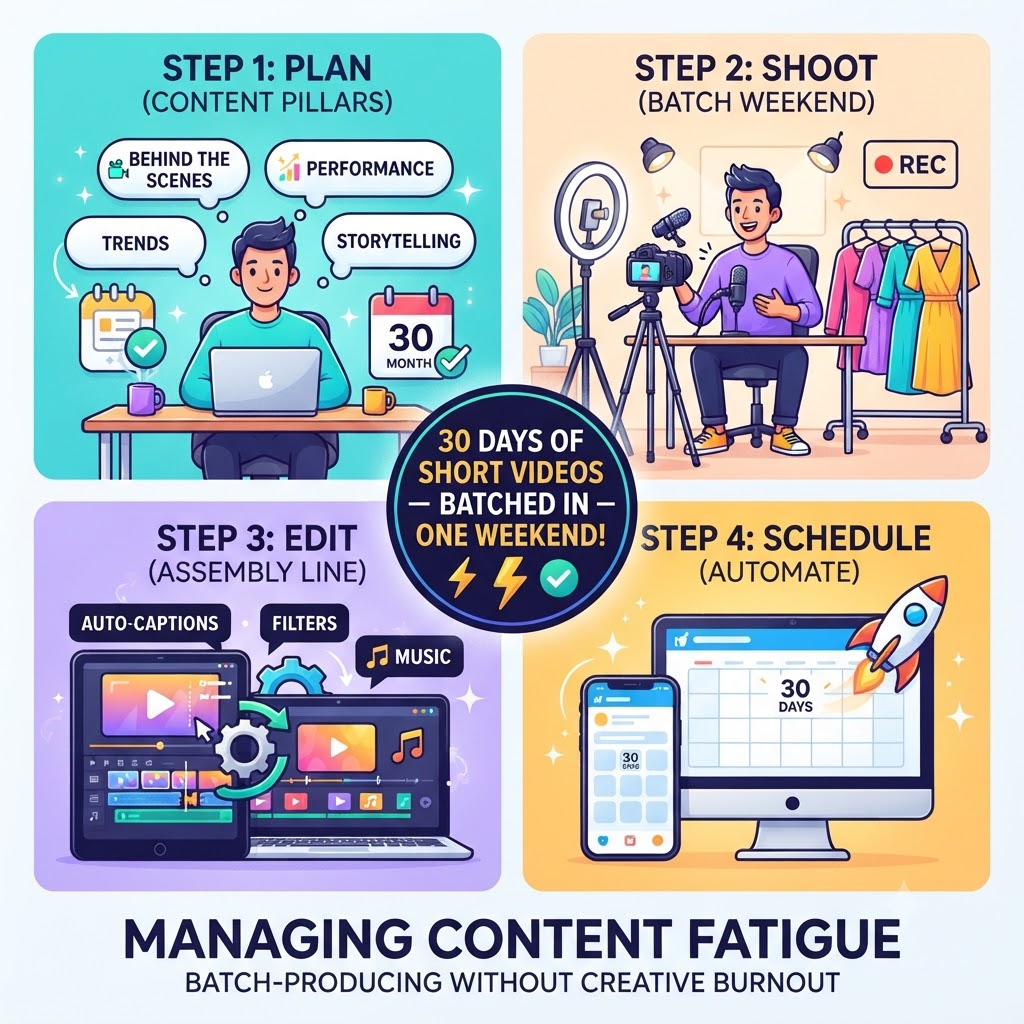
Managing Content Fatigue: How to Batch-Produce 30 Days of Short-Form Videos Without Burning Out
Let’s be honest: if you’ve spent any time trying to grow a brand, build a business, or push your music on TikTok, Instagram Reels, or YouTube Shorts, you’re probably exhausted.
Every single platform guru tells you the exact same thing: “Consistency is key. You need to post every single day.”
So, you try. You wake up on a Tuesday morning, stare at your phone, and try to force inspiration. You try to think of a catchy hook, figure out what to wear, test out the lighting, record ten messy takes, stumble over your words, and then spend two hours trying to figure out a trendy editing app. By the time you finally hit “publish,” you’re completely drained.
Multiply that by seven days a week, four weeks a month, and it’s no wonder creative burnout hits hard. You stop feeling like a creator or an artist and start feeling like an overworked factory worker on an endless assembly line.
There has to be a better way. And thankfully, there is.
If you want to keep your feeds active 24/7 without losing your sanity, you need to step off the daily content hamster wheel and learn how to batch-produce. Here is your complete, human-tested blueprint for knocking out a full month of short-form videos in a single weekend.
Why Real-Time Content Creation Destroys Your Creative Energy
To understand why batch-producing changes everything, we have to look at why daily posting burns us out so fast. It isn’t actually the work itself that exhausts us; it’s context-switching.
When you try to create a video from scratch every day, your brain has to jump through massive hoops:
-
The strategist: What should I talk about today?
-
The producer: Let me clear my desk, set up the tripod, and fix my lighting.
-
The talent: Time to look energetic, charismatic, and camera-ready.
-
The editor: Let’s trim out dead air, add captions, pick a trending audio track, and fix the color.
Jumping between those four completely different mental states every single day drains your creative battery. By day four, you’re uninspired, your content feels forced, and your audience can tell you’re just phoning it in to check a box.
Batch production fixes this by grouping similar tasks together. By dedicating specific blocks of time to specific tasks, you tap into a state of deep flow where your efficiency explodes.
Step 1: The Pillar Strategy (Mapping Out 30 Days Without the Stress)
The biggest mistake people make when batching is sitting down with a blank notepad and trying to think of 30 video ideas on the spot. That’s a fast track to staring blankly at a screen for two hours.
Instead, structure your month using the Content Pillar Framework. Break down your niche, business, or music career into four or five core themes.
For instance, if you’re an independent music artist promoting a new single, your four pillars might look like this:
-
Pillar 1: Behind-the-Scenes & Process (8 videos) – Showcasing raw studio footage, writing lyrics on your phone notes, breaking down how you made the beat, or showing your setup.
-
Pillar 2: Performance & Vibe Tests (8 videos) – Lip-syncing to the best parts of the track, raw acoustic car tests, or live performance snippets.
-
Pillar 3: Storytelling & Personal Connection (7 videos) – Explaining what inspired the song, sharing personal struggles, or answering real questions from fans.
-
Pillar 4: Trend-Jacking & Entertainment (7 videos) – Leaning into relatable humor, industry memes, or adapting popular audio trends to fit your specific world.
Once you have your four pillars, spend an hour filling in a spreadsheet or Notion board with 30 simple hook lines and brief bullet points for what you’ll say in each clip. Don’t script every word—just outline the core thought.
Step 2: The Batch-Shooting Weekend (One Outfit, Multiple Angles)
Once your ideas are mapped out, it’s time to shoot. This is where you leverage the magic of efficiency. You aren’t going to set up your camera every day. You’re going to set it up once and knock out all 30 videos in a single afternoon.
-
Lock Down Your Setup: Set up your tripod, ring light, and microphone in a clean corner of your room or studio. Lock your camera framing and exposure so it stays identical.
-
The Outfit Trick: If you shoot all 30 videos wearing the exact same hoodie, it’s going to look weird if you post them back-to-back. The simple fix? Bring three different shirts or jackets to your shoot. Change your top halfway through, or shoot half the videos sitting down and half standing up. To your audience scrolling on their feeds days apart, it will look like completely separate filming sessions.
-
Read Your Hooks: Keep your list of 30 hooks open on a laptop screen placed right next to your camera lens, or use a free teleprompter app.
-
Embrace the Power of Repetition: Turn on the camera and record all 8 videos from Pillar 1 back-to-back. If you mess up a line, don’t stop recording—just clap your hands, pause for a second, and restart the sentence so you can easily cut it out later. Do 2 or 3 quick takes of each, pick the best one, and move on.
Before you know it, you’ll have a memory card full of raw footage, and you haven’t even broken a sweat.
Step 3: Streamlining Your Editing Assembly Line
If you try to edit 30 videos the exact same way you shot them—one by one, start to finish—you’re going to burn out all over again. Treat post-production like a factory assembly line.
-
The Rough Cut Phase: Drop all 30 video clips into your editing software of choice (CapCut, Premiere Pro, or DaVinci Resolve). Go down the line and trim out the dead air, awkward pauses, and failed attempts at the beginning and end of each clip.
-
The Caption Phase: Short-form video lives and dies by subtitles. Use an auto-caption tool to generate text for all your clips at once. Spend a little time fixing any weird spelling errors for your specific brand name, slang, or niche terminology.
-
The Styling & Polish Phase: Apply your preferred color filter, background music tracks, and graphic overlays in bulk across the board.
By grouping these steps, you can knock out the editing for an entire month’s worth of content in one productive afternoon session.
Step 4: Schedule and Walk Away
Once your videos are fully edited, exported, and cleanly named in a folder on your computer (Day_01_StudioVlog.mp4, Day_02_AcousticSnippet.mp4, etc.), your job for the month is practically done.
Upload your batch into a reliable social media scheduling tool like Metricool, Buffer, or Later. Draft your captions, drop in your researched SEO keywords and hashtags, and schedule them to drip out steadily over the next four weeks.
Once you hit schedule, you can close the apps. You are free from the daily pressure of content creation. You can put your phone down, go back to focusing on your actual craft, your music, or your business, and let your automated system do the heavy lifting in the background.
Turn Your Organic Hype Into a Real Momentum Campaign
Batch-producing short-form videos is the ultimate way to build pre-release excitement, then launch a full campaign using our tailored rap promotion strategies. Organic consistency gets people looking your way, but a structured promotional push is what actually turns casual scrollers into lifelong fans and active listeners.
Final Thoughts
Creative burnout isn’t a moral failing, and it doesn’t mean you aren’t cut out for content creation. It almost always means your workflow is working against you instead of for you.
By shifting away from the stressful daily scramble and embracing content pillars, weekend batch-shooting, and streamlined editing, you can take back your time, protect your mental energy, and consistently show up where your audience is paying attention.
Block out a weekend on your calendar, prep your next 30 days, and experience what it feels like to create on your own terms.